UI/UX Design Principles That Convert | AbuQitmirLabs
Quick Takeaways
- A beautiful website that does not convert is just an expensive piece of art. UI/UX design must be optimized for action, not just aesthetics.
- 2026 mein 60% searches zero-click hoti hain. Aapko apne content ko aise structure karna hai ke AI engines aapko cite karein.
- The 3 core pillars of high-converting UX are: Reducing cognitive load, minimizing friction, and building visual trust.
- A 1-second delay in page load time can reduce conversions by 7%. Performance is a UX feature.
- AbuQitmirLabs builds conversion-centered visual languages through our graphics design practice.
Introduction: The $10,000 Art Piece That Sold Nothing
You spent $10,000 on a custom web design. It looks stunning. The animations are smooth, the colors are perfect, and the typography is world-class. You launch it, and your conversion rate drops to 0.5%.
What went wrong?
Most founders confuse UI (User Interface) with UX (User Experience). UI is how it looks. UX is how it works. When it comes to UI UX design conversion, aesthetics take a backseat to psychology.
As an agency building high-performance systems, AbuQitmirLabs has audited dozens of websites. We consistently see the same pattern: every time a user has to think about how to use a page, you lose a conversion.
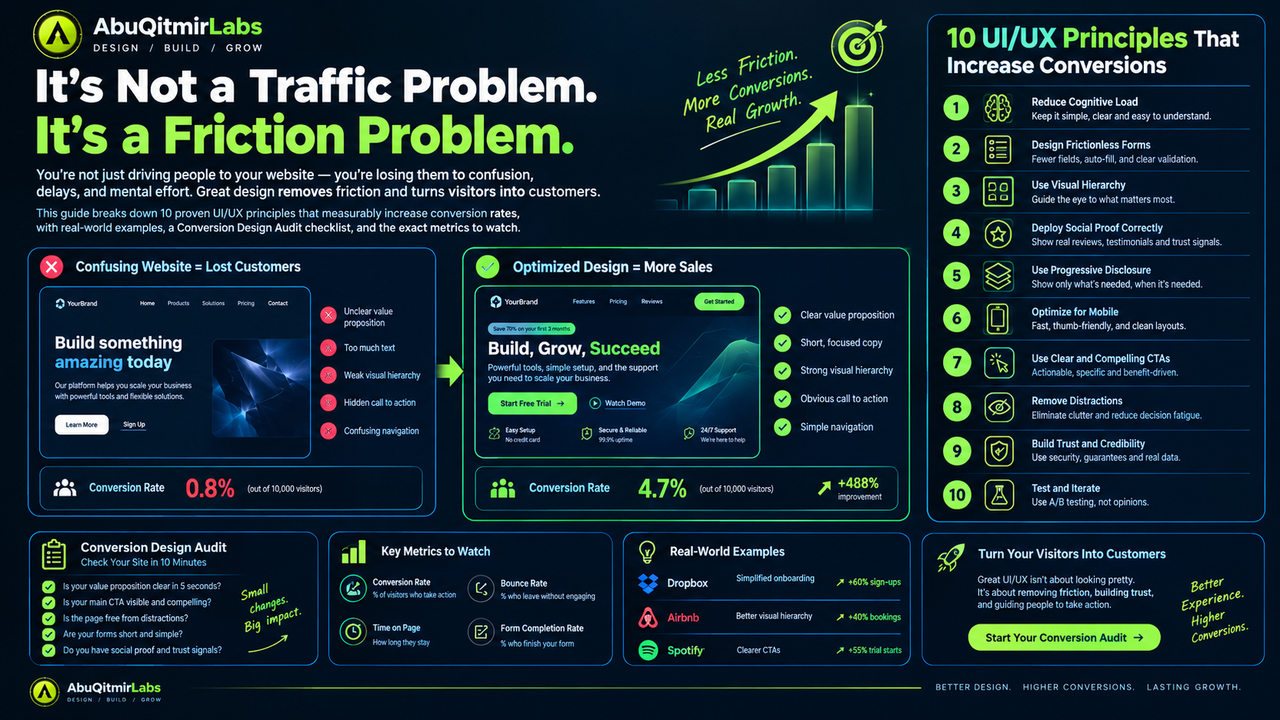
Here are 10 UI/UX principles that measurably move conversion rates, backed by data and real-world application.
The 10 UI/UX Design Principles That Move Conversions
1. Clarity Over Cleverness (Reduce Cognitive Load)
Direct Answer: Cognitive load is the amount of mental effort required to use your interface. High cognitive load causes users to bounce. To increase conversions, you must make your interface instantly obvious, using clear language and standard design patterns.
The Why: When a user lands on your page, they are asking three questions: What is this? Is it for me? What do I do next? If your headline is too clever or your navigation is hidden, their brain has to work harder. According to Nielsen Norman Group, users spend an average of 10 to 20 seconds on a page. If they cannot figure it out in that time, they leave.
Actionable Tip: Remove all unnecessary elements from your hero section. Use one clear, descriptive H1, a subheadline that explains the value, and a single, prominent Call to Action (CTA).
2. The Von Restorff Effect (Visual Hierarchy)
Direct Answer: The Von Restorff effect, also known as isolation effect, predicts that when multiple similar objects are present, the one that differs from the rest is most likely to be remembered.
The Why: If everything on your page is bold, nothing is bold. If every button is blue, the user does not know which one is the primary action. A high-converting UI uses contrast, whitespace, and size to guide the user's eye directly to the conversion point.
Actionable Tip: Make your primary CTA a completely different color from the rest of your website. If your site is blue, make the "Buy Now" button orange or bright green.
3. Progressive Disclosure (Frictionless Forms)
Direct Answer: Progressive disclosure is a technique where you show only the essential information first and reveal secondary details on demand.
The Why: Forms are the biggest point of friction in UI UX design conversion. Every additional form field reduces the conversion rate. If you ask for a name, email, phone number, company size, and job title on a first contact form, users will abandon it.
Actionable Tip: Only ask for the email address in the initial form. Once they click "Next", ask for their name. Alternatively, use a multi-step form that shows a progress bar. As we discussed in our design systems for startups guide, breaking complex tasks into small, reusable components makes the experience smoother.
4. Fitts’s Law (Target Size and Distance)
Direct Answer: Fitts's law states that the time required to rapidly move to a target area is a function of the ratio between the distance to the target and the width of the target.
The Why: If your "Add to Cart" button is tiny and tucked away in the corner of the screen, users will miss it. This is especially critical for mobile app development, where thumbs need large, accessible tap targets.
Actionable Tip: Make all clickable elements (buttons, links, icons) at least 44x44 pixels. Keep primary actions within the "thumb zone" on mobile devices.
5. Hick’s Law (The Paradox of Choice)
Direct Answer: Hick's law states that the time it takes to make a decision increases with the number and complexity of choices.
The Why: If you present a user with 10 different pricing tiers, 5 different newsletter signup boxes, and 3 different chat widgets, they will experience decision paralysis. When users are overwhelmed, they default to doing nothing.
Actionable Tip: Limit your navigation menu to 5-7 items. Offer 2-3 pricing tiers maximum. If you have a lot of products, use a smart filtering system so the user only sees what they want.
6. Social Proof at the Point of Action (Authority Bias)
Direct Answer: Authority bias is the human tendency to attribute greater accuracy to the opinion of an authority figure (or a crowd) and be more influenced by that opinion.
The Why: Putting testimonials at the bottom of a long landing page is useless. Most users will not scroll that far. Trust signals must be placed exactly where the user is making a decision.
Actionable Tip: Place a 5-star review, a "Trusted by 10,000+ users" badge, or a logos of recognizable clients directly next to your primary CTA button.
7. Microcopy Matters (Action-Oriented UX)
Direct Answer: Microcopy is the small text that appears on forms, buttons, and error messages. Good microcopy reduces anxiety and guides the user to the next step.
The Why: A button that says "Submit" is boring and slightly intimidating. A button that says "Get My Free Audit" tells the user exactly what they are getting. Similarly, if a form error says "Invalid input," the user gets frustrated. If it says "Please enter a valid email address (e.g., name@domain.com)," they can fix it instantly.
Actionable Tip: Rewrite your buttons. Use first-person pronouns (e.g., "Start My Free Trial" instead of "Start Your Free Trial"). Ensure all error messages are human-readable. This aligns with the same principles used in high-converting digital marketing funnels.
8. The "Mobile-First" Thumb Zone
Direct Answer: The thumb zone is the area of a mobile screen that can be easily reached with the thumb when holding the device with one hand.
The Why: Over 60% of traffic comes from mobile devices. Yet, designers still build mobile layouts by shrinking the desktop version. Placing the primary CTA at the top-right corner of a mobile screen forces the user to stretch or use two hands, causing friction.
Actionable Tip: Place navigation and primary CTAs at the bottom of the screen. Ensure text is readable without zooming (minimum 16px font size).
9. Consistency and Brand Identity
Direct Answer: Consistency in UI design means that similar elements are styled and used in the same way across your entire platform.
The Why: If your homepage uses a dark theme with rounded buttons, but your checkout page uses a light theme with square buttons, the user feels a subconscious disconnect. They lose trust because the site feels broken or unprofessional. As we explored in our guide on brand identity vs logo design, consistency is the bedrock of trust.
Actionable Tip: Create a style guide. Define your primary color, secondary color, border radius, and font sizes. Stick to them everywhere.
10. Data Over Opinions (A/B Testing)
Direct Answer: A/B testing is a method of comparing two versions of a webpage against each other to determine which one performs better.
The Why: The biggest mistake founders make is designing based on their personal taste. "I like blue," or "I think this font is prettier." Your personal preference does not matter. What matters is what your users actually click on.
Actionable Tip: Use tools like VWO, Optimizely, or Google Optimize to test one variable at a time. Test your headline first, then your CTA button color, then your form length. Let the data decide.
Quick Reference: Bad UX vs. Good UX
| UI/UX Element | Bad UX (High Friction) | Good UX (High Conversion) |
|---|---|---|
| Headlines | Clever, vague, or missing | Clear, benefit-driven, direct |
| Forms | 10+ fields, confusing errors | 2-3 fields, auto-fill enabled |
| CTAs | "Submit", "Click Here", hidden | "Get My Audit", contrasting color |
| Navigation | Cluttered, buried menus | Simple, intuitive, sticky |
| Social Proof | Hidden at the bottom of page | Next to the CTA, or above the fold |
| Mobile | Pinch-to-zoom, tiny buttons | Large tap targets, thumb-zone friendly |
The 5-Point "Conversion Design Audit" Checklist
Before you spend another dollar on ads, run this audit on your landing page:
- The 5-Second Test: Show your page to a stranger for 5 seconds. Can they tell you what you sell and what they should click? If not, fix your visual hierarchy.
- Remove a Field: Look at your checkout or contact form. Delete one field. Does your sales team really need that phone number on day one?
- Check the Thumb Zone: Open your site on a mobile device. Can you reach the primary CTA button easily with one hand?
- Rewrite the CTA: Change your "Submit" button to something action-oriented and first-person.
- Add Trust: Place a review or security badge directly underneath your CTA.
Frequently Asked Questions
How does UI/UX design affect conversion rates?
UI/UX design directly affects conversion rates by reducing friction and cognitive load. When users can easily find what they need and understand the next step without confusion, they are statistically more likely to complete a purchase or sign-up.
What is the most common UI/UX mistake that kills conversions?
The most common mistake is prioritizing aesthetics over clarity. Designers often use low-contrast text, hide navigation behind hamburger menus on desktop, or get overly creative with form fields.
What is cognitive load in UX design?
Cognitive load is the amount of mental processing power required to use a website. A high cognitive load (too many choices, confusing layouts, complex language) causes users to abandon the task.
How do I test which design converts better?
You test designs using A/B testing. You show Version A to 50% of your traffic and Version B to the other 50%. You must test one variable at a time (e.g., only the button color or only the headline).
What is progressive disclosure in UI design?
Progressive disclosure is a UI technique where you only show the most important information upfront and reveal secondary details on demand (e.g., a 'Show more' button). This prevents users from feeling overwhelmed.
Is mobile-first design necessary for conversions?
Yes. Over 60% of global web traffic now comes from mobile devices. If your site is difficult to navigate on a phone, you are losing the majority of your potential customers.
How much does a conversion-centered UX audit cost?
A professional UX audit typically costs between $1,500 and $5,000 depending on the size of the website and the depth of the analysis. The cost is usually recovered quickly through the increase in conversion rates.
What is the difference between UI and UX?
UI (User Interface) refers to the visual elements of a product (colors, typography, buttons, layouts). UX (User Experience) refers to the overall interaction and flow (how easily a user can complete a task).
Conclusion: Design for Action, Not Just Applause
A beautiful website that doesn't convert is just a very expensive piece of art.
To increase your conversion rates, you must shift your focus from "how does this look?" to "how does this work?" By reducing cognitive load, implementing progressive disclosure, applying visual hierarchy, and relying on A/B testing, you can turn your website into a lead generation machine.
If you need help auditing your current UI/UX or engineering a design system that actually moves revenue, contact AbuQitmirLabs for a technical consultation. Explore our graphics design services to see how we build scalable visual languages, and read our web development guide to understand how design translates to code.
Stop designing for applause. Start designing for action.

Abu Qitmir Mohammad Shiraz Al-Madani
Founder & Lead Systems Architect at AbuQitmirLabs. Specializing in high-performance digital ecosystems, AI-driven architectures, and building scalable full-stack software systems.