Analysis
Deep Business Workflow Understanding
Before we write a single line of code, we analyze your operational bottlenecks, target audience, and long-term objectives.
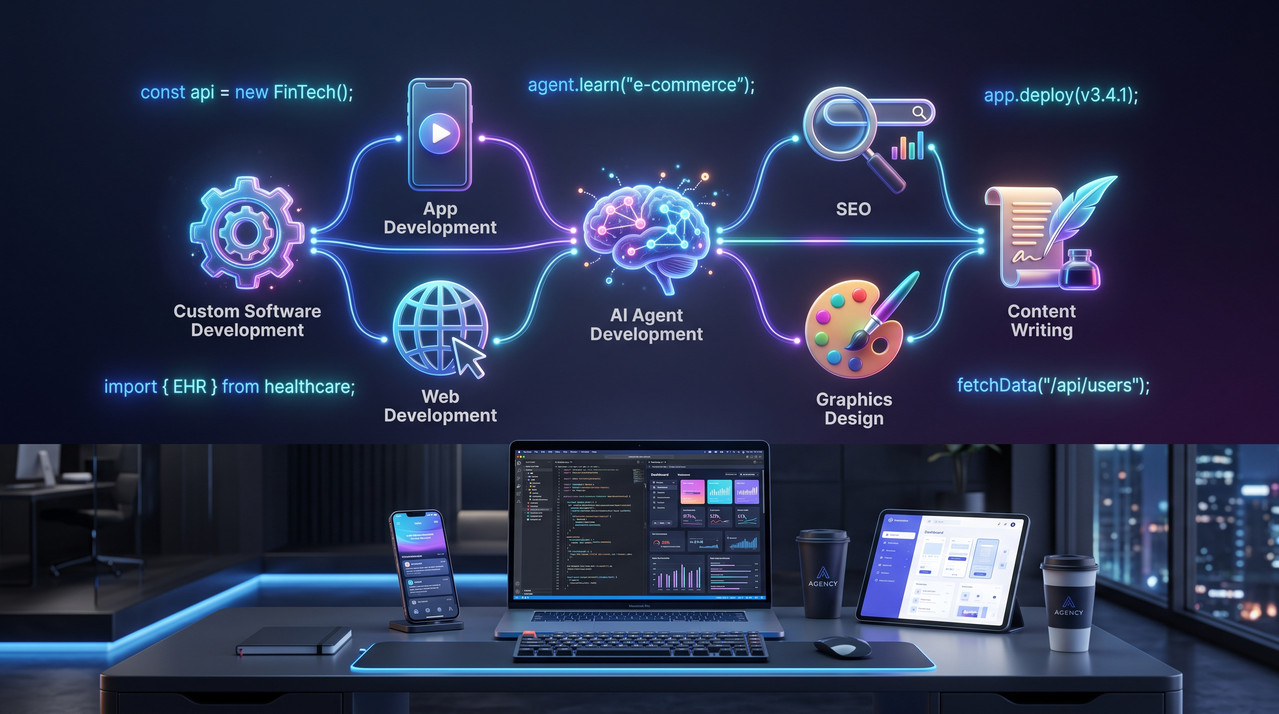





As a dedicated custom software development company and AI agency based in Karachi, we use AI to build fast without hiding behind it. Every line of code, every architecture decision, and every deployment for our US, UK, Canadian, and Australian clients is personally engineered and reviewed—not generated and shipped unchecked.
“AbuQitmirLabs is a premier custom software development company delivering AI app development services, custom website development services and enterprise software solutions to clients across the United States, United Kingdom, and Europe.”
We measure success by your revenue growth.
100% secure, scalable, and robust architecture.
Proven experience, expertise, and authority.
“AbuQitmirLabs doesn't just build websites—they architect growth engines. Their strategic thinking transformed our digital presence.”
James R.
SaaS Founder, United States
Verified entity on Google Business recognized for technical excellence.
AbuQitmirLabs is an independent software studio and technical consulting practice. We architect modular, secure digital products for ambitious startups and global enterprises — moving beyond fragile off-the-shelf software to build owned digital assets that scale seamlessly across markets.
We design resilient digital interfaces and decoupled cloud platforms with sub-second performance. For comprehensive architectural specifications, technical frameworks, and delivery roadmaps, explore our dedicated engineering practices:
We develop multi-agent intelligence systems, semantic retrieval engines, and localized LLM integrations to automate operational bottlenecks. For detailed case studies and deployment methodologies, visit our specialized division:
We build native-grade mobile products on Flutter and React Native with unified codebases, biometric hardware authentication, and offline synchronization. Explore our full mobile capability matrix and store launch process:
Search discoverability is an engineering discipline requiring semantic Schema.org entity networks, Core Web Vitals optimization, and generative answer engine indexing (GEO/AEO). To review our specific organic search frameworks and localized map strategies:
Our homepage acts as an institutional knowledge hub, distributing contextual authority to dedicated technical practices across software, mobile engineering, AI agents, and search optimization.
Operating proudly as an elite software engineering studio based in Karachi, Pakistan, AbuQitmirLabs combines international delivery standards with optimal capital efficiency. When international leadership teams choose to work with us, they gain direct access to senior software architects, test-driven development methodologies, and 100% intellectual property ownership without administrative bureaucracy.
Whether you are launching a new FinTech venture, scaling an e-commerce infrastructure, or automating enterprise operations with autonomous AI agents, AbuQitmirLabs stands ready to design, deploy, and support your computational assets.
ACTIVE LAB • ZERO-TRUST ARCHITECTURE • 100% SOURCE REPO HANDOVER
Plan, audit, and optimize — no signup required. Engineered to give founders, CTOs, and marketers instant clarity.
Know your custom software, app, or web build cost before development.
Full Core Web Vitals, mobile responsiveness, and SEO health check.
Interactive 45-point pre and post-launch checklist for organic ranking.
Evaluate your business workflows and infrastructure for AI agents.
Find the optimal architectural stack tailored to your exact constraints.
Measure Open PageRank score, Wayback domain tenure, and link assets.
Most digital agencies operate like factories—they just "build software" and hand it over. At AbuQitmirLabs, we operate as your strategic technical partners. We build comprehensive solutions designed to solve real, complex business problems. We do not just deliver lines of code; we deliver measurable results.
Before we write a single line of code, we analyze your operational bottlenecks, target audience, and long-term objectives.

We build systems that grow with you. Our legacy system modernization services ensure you are never held back by outdated tech.
Speed is a massive ranking and conversion factor. Our engineering prioritizes sub-second load times and seamless interactions.
The digital world evolves daily. We provide ongoing optimization to ensure your digital assets remain cutting-edge.
Autonomous AI workflows and intelligent automation.
Integrating disjointed systems into a single ecosystem.
No technical limitations using cloud-native infrastructures.
Zero-friction navigation and intuitive UI/UX design.
In an era dominated by AI and highly intelligent search algorithms, generic services fail. We utilize semantic entity optimization and advanced development frameworks to give you an unfair advantage.
Transparency and precision are the core of our operations. We follow a highly structured, agile methodology so you are always informed and in control of your project's trajectory.
We sit down with you to deeply understand your business ecosystem, identify pain points, and define clear, measurable goals.
We create intuitive, modern, and conversion-optimized wireframes and prototypes, allowing you to visualize the end product.
Our engineers write clean, scalable, and modular code, ensuring the foundation of your software is indestructible.
We subject the project to intense performance, security, and reliability testing across multiple devices and environments.
We ensure a smooth launch and remain by your side to provide continuous maintenance, updates, and strategic scaling.
We refuse to rely on outdated frameworks. We utilize a modern, battle-tested tech stack renowned for its speed, infinite scalability, and military-grade security.

Watch our lead architect AbuQitmirLabs breakdown complex digital ecosystems.
Deep dive into High-Performance Web Tech and scalable backend systems.
How we implement autonomous LLM agents to automate business workflows.
A look at our detailed technical roadmap building for enterprise clients.
Quick insights into modern tech stacks and semantic search optimization.
A vision for secure, fast, and highly intelligent digital transformations.
EdTech — Built from scratch with advanced AI & SEO.
Full-stack Next.js educational platform for an online Quran academy. Built with the world's first RAG-powered AI Tajweed Teacher, international SEO targeting 20+ countries, pricing tiers, teacher profiles, and a complete student enrollment system.
Live one-on-one classes with certified scholars. Dynamic scheduling tailored beautifully for USA, UK, Canada & Australia.
A curated selection of high-performance digital systems, custom-designed to drive engagement, conversions, and operational excellence.
Horror Fiction Platform — Stories That Haunt You
Full-stack horror content platform for original creepypasta and audio storytelling. Built with cinematic design, scroll-driven animation, and a fully custom publishing backend. SEO architecture designed to meet AdSense standards from launch — not retrofitted after.
*Capacity benchmark based on database schema and storage backend modeling.

Multi-Platform Healthcare Ecosystem
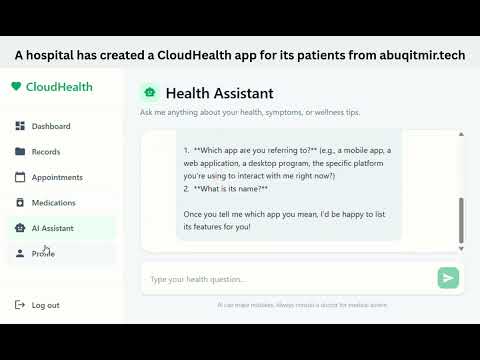
Advanced end-to-end patient care platform running on Web, Desktop (Electron), and Mobile (Capacitor). Features Gemini AI-powered health assistant, live vitals tracking, appointment scheduling, prescription logs, and secure medical record vault.
*Security and compression standards based on architecture modeling and client-side encryption protocols.
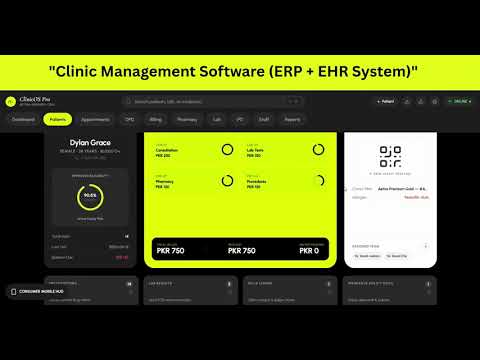
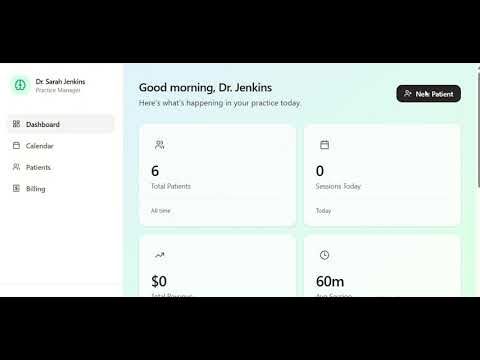
Clinical ERP & Electronic Health Record System
Premium, high-density, offline-resilient Clinical ERP and EHR application for healthcare centers, private practices, and outpatient clinics. 11 operational screens consolidated into a single, unified dashboard — eliminating paper trails, reducing waiting times, and delivering a professional corporate image.
*Workflow outcome reflecting full digitization of clinical paper records in the ERP architecture.
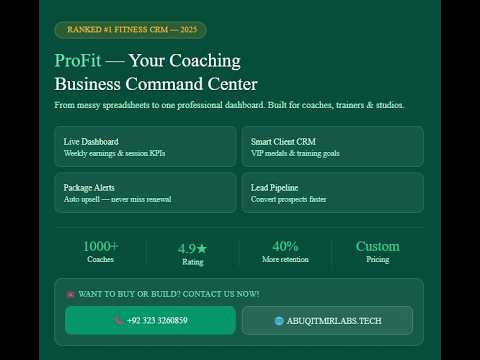
High-End CRM for Personal Trainers
Bespoke, premium client-relationship management and scheduling dashboard designed specifically for elite independent personal trainers. Features real-time session tracking, proactive retention alerts, dynamic client profiles, and premium cinematic design.
*Projected efficiency and retention metrics are calculated from workflow automation modeling vs. manual spreadsheets, not a multi-year client cohort.
From idea conceptualization to ultra-optimized live implementation — we build fast, modern, and high-conversion assets.
Clients and businesses based in South Asia (Pakistan, India, Bangladesh) are eligible for localized regional pricing and dedicated currency support. Please connect with our team directly on WhatsApp for tailored commercial quotes.
پاکستان، بھارت اور بنگلہ دیش میں مقیم کلائنٹس اور کاروباری اداروں کے لیے خصوصی علاقائی قیمتیں اور کرنسی سپورٹ دستیاب ہے۔ براہِ کرم واٹس ایپ پر ہماری ٹیم سے براہِ راست رابطہ فرمائیں۔
Custom-built React & Next.js websites designed strictly to transform traffic and maximize daily sales funnels. Select the appropriate blueprint.
Perfect for personal brands & small projects
Speedy entry into high-performance web ecosystems.
Ideal for growing businesses ready to scale
Our high-engagement flagship cms build.
Full-featured online stores that sell
Maximize checkout conversion with no database limits.
Enterprise-grade websites with advanced features
Bespoke high-end digital design optimized for search authority.
"World's First AI-Powered Quran Learning Platform"
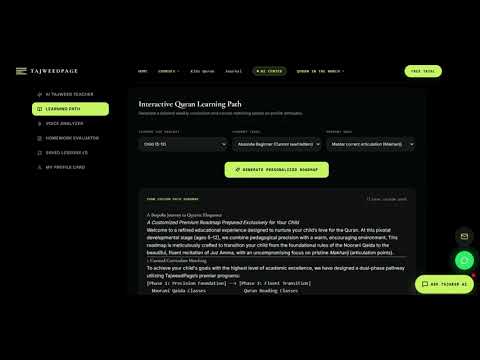
Built a complete Next.js EdTech platform for TajweedPage Online Academy — 15+ pages, 7 dedicated course landing pages, geo-targeted pages for 20+ countries, and the world's first RAG-based AI Tajweed Teacher trained on authentic Islamic scholarly sources.
Verified Production Deployment:*Live client production software system actively serving international student cohorts across 20+ countries. Engineered and maintained by AbuQitmirLabs.

Retrieved authority answers on Ahkam-un-Noon-as-Sakinah dynamically, utilizing high-accuracy vector contextual match hooks.
More case studies coming soon.
Direct feedback from our global network of high-performance partners.
Get instant answers to the most common questions about our high-performance technical solutions and strategic operations.
We specialize in Fintech, E-commerce, Healthcare, logistics, and SaaS platforms. Our engineering team provides high-performance, secure, and scalable digital solutions tailor-made for these high-stakes industries where data integrity and user trust are paramount.
A standard MVP (Minimum Viable Product) usually takes 8-12 weeks to design and deploy. Larger, complex enterprise solutions can take 4-6 months depending on the depth of integrations and specific business logic required. We use Agile methodology to deliver usable features rapidly, ensuring you can start testing your market fit as early as possible.
Traditional, monolithic websites are often slow, hard to scale, and vulnerable to security breaches. By leveraging Jamstack web development and headless CMS integration services, we decouple your frontend from your backend database. The result? Lightning-fast, sub-second load times that easily pass Google’s Core Web Vitals. This speed drastically reduces bounce rates and provides a frictionless journey that converts casual visitors into buyers.
A standard chatbot follows rigid, rule-based scripts and often frustrates users when questions go off-script. In contrast, our custom LLM agents for workflow automation are fully autonomous. Powered by large language models, they understand deep context, learn directly from your proprietary data, and can independently execute complex tasks—from handling 24/7 intelligent customer support to deep data analysis—without requiring human intervention.
Traditional SEO relies heavily on stuffing exact-match keywords into text. Semantic Entity SEO optimization is about building a recognizable, trusted digital identity that Google's AI understands conceptually. Instead of just ranking for words, we build your topical authority. Combined with our Google Business Profile authority building, this hyper-local strategy ensures you dominate map results and capture high-intent, ready-to-buy customers in your vicinity.
Absolutely. Beautiful design is meaningless if it doesn't drive action. Our conversion-focused brand identity design goes beyond aesthetics. By applying accessible design principles and intuitive UI/UX layouts, we remove friction from the user journey. Every memorable logo, color palette, and social media creative we craft is strategically formulated to build instant trust and subtly guide the user toward making a purchase.
E-E-A-T stands for Experience, Expertise, Authoritativeness, and Trustworthiness. In an internet flooded with generic, AI-generated text, search engines now penalize low-quality content and reward verifiable human expertise. We use detailed semantic content briefs to write E-E-A-T focused technical content. From high-converting landing pages to thought-leadership blog posts, we craft copy that satisfies complex search algorithms while building genuine trust with human readers.
Custom software development in Pakistan typically ranges between $5,000 and $25,000 for production-ready platforms, delivering 60% to 75% cost savings compared to US ($50,000–$150,000+) and UK agency equivalents. At AbuQitmirLabs, we uphold international engineering standards, zero-debt architecture, and strict code review protocols. For a granular breakdown tailored to your scope, explore our interactive Project Cost Estimator tool to calculate instant estimates.
Yes. Over 80% of our clients operate across the United States, United Kingdom, Canada, and Australia. We operate with dedicated timezone overlap (4–6 hours daily with EST/PST and full afternoon overlap with GMT/BST). Our distributed delivery workflow leverages Slack, GitHub, Jira, Loom asynchronous video walkthroughs, and weekly video strategy calls to maintain 100% transparency, rapid iteration sprints, and seamless communication across borders.
ready to automate operations with autonomous ai or build sub-second speed products? book a call or submit the tactical briefing form below to trigger your launch.
Get a comprehensive, 45-point live audit of your current site's Core Web Vitals, semantic schema tagging, conversion traps, and search index coverage.
Complimentary technical consultation available with our senior engineering leads.
The digital landscape waits for no one. Stop settling for mediocre solutions that drain your budget without delivering ROI. Partner with AbuQitmirLabs to build secure, fast, and highly intelligent digital assets that propel your business forward.
Let's discuss your next big project. Our initial technical consultation and digital audit are completely free.
Connect via Email • Updated: September 2026