Mobile App UI/UX Design Guide for Better User Retention (2026)
Most app founders think users leave because:
- the app lacks features
- marketing is weak
- competition is too strong
Sometimes that’s true.
But often, users leave for a much simpler reason:
The app feels frustrating to use.
That frustration usually comes from poor UI/UX design.
Small design mistakes quietly destroy:
- retention
- engagement
- trust
- conversions
- monetization
A slow onboarding screen… A confusing navigation menu… A cluttered dashboard…
These things seem small individually.
Together, they decide whether users:
- keep using the app
or
- uninstall it forever.
“Great app design is invisible. Users simply feel comfortable using it.”
And in 2026, user expectations are higher than ever.
People now compare your app experience against:
- TikTok
- Uber
- Airbnb
- Notion
- ChatGPT mobile apps
That means even startups need polished UX.
This guide explains:
- app UI/UX fundamentals
- how design affects retention
- onboarding psychology
- navigation systems
- mobile UX best practices
- common UI mistakes
- AI-powered UX trends
- practical workflows for startups
Whether you’re building:
- a startup MVP
- an AI app
- a fintech platform
- a healthcare app
- a SaaS system
- an e-commerce app
this guide will help you design apps users actually want to keep opening.
What Is UI/UX Design?
Many people confuse UI and UX.
They’re connected — but different.
What Is UI Design?
UI means: User Interface
It focuses on:
- visual design
- buttons
- colors
- typography
- layouts
- animations
UI is how the app looks.
What Is UX Design?
UX means: User Experience
It focuses on:
- usability
- workflows
- navigation
- user psychology
- friction reduction
UX is how the app feels.
Why UI/UX Matters More Than Features
A lot of startups overbuild features while ignoring usability.
That creates apps that are:
- powerful
- complicated
- overwhelming
Users rarely stay in confusing apps.
Even strong functionality fails when:
- onboarding feels hard
- navigation feels unclear
- interactions feel slow
How UI/UX Directly Impacts Retention
Good UI/UX increases:
- session time
- engagement
- user trust
- conversion rates
- retention
Poor UI/UX increases:
- uninstall rates
- churn
- frustration
- support complaints
Why Retention Matters More Than Downloads
Downloads are temporary.
Retention creates businesses.
An app with:
- 10,000 downloads
- terrible retention
is weaker than an app with:
- 1,000 loyal active users.
The Psychology Behind App Retention
Users continue using apps that feel:
- simple
- rewarding
- predictable
- fast
Strong UX reduces mental effort.
That matters more than most founders realize.
First Impressions Matter
Users decide extremely quickly whether an app feels trustworthy.
Often within:
- seconds
- not minutes
Common First-Impression Problems
❌ Slow loading
❌ Cluttered screens
❌ Confusing onboarding
❌ Too many popups
❌ Aggressive permissions
Better First-Impression Strategy
Focus on:
- speed
- simplicity
- clarity
before adding complexity.
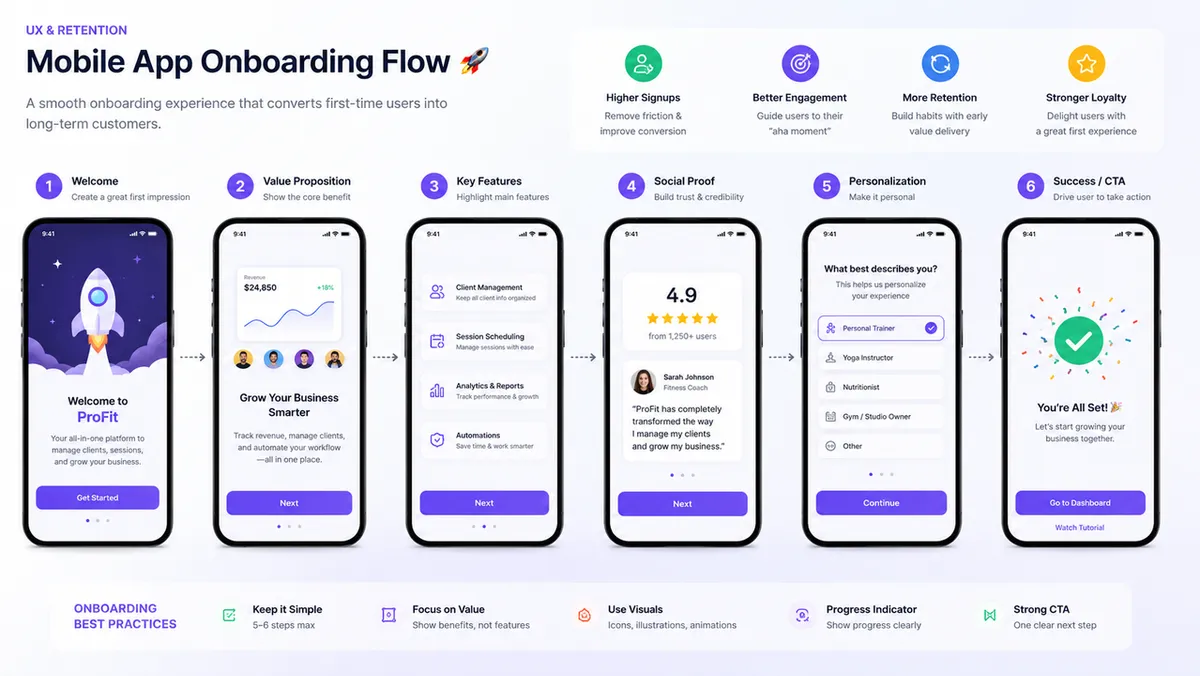
App Onboarding Design
Onboarding is one of the biggest retention factors.
Bad onboarding creates:
- confusion
- drop-offs
- abandoned installs
Strong Onboarding Principles
✅ Minimal Steps
✅ Clear Value Proposition
✅ Guided Experience
✅ Fast Setup
✅ Visual Simplicity
Example
Bad onboarding:
- 12 screens
- forced signup immediately
- complicated tutorials
Better onboarding:
- quick walkthrough
- immediate value
- optional account creation later
Why Simplicity Wins
Users do not want to “study” your app.
They want:
- convenience
- clarity
- speed
The best apps remove unnecessary thinking.
Navigation Design Principles
Navigation affects retention heavily.
Users should always know:
- where they are
- what to do next
- how to return
Strong Navigation Systems
✅ Bottom Navigation Bars
✅ Predictable Layouts
✅ Clear Icons
✅ Search Functionality
✅ Consistent Menus
Common Navigation Mistakes
❌ Hidden Features
❌ Too Many Menus
❌ Inconsistent Icons
❌ Confusing Flows
Mobile UI Design Best Practices
1. Prioritize Readability
Users scan mobile screens quickly.
Improve readability with:
- proper spacing
- larger typography
- clean contrast
2. Reduce Clutter
Minimal interfaces usually retain users longer.
Clutter increases cognitive overload.
3. Use Visual Hierarchy
Important actions should stand out clearly.
Users should instantly notice:
- CTA buttons
- navigation
- primary actions
4. Design for Thumb Reach
Most users operate apps one-handed.
Important controls should remain reachable.
5. Keep Interactions Fast
Micro-delays frustrate users more than founders expect.
UI/UX for Different App Types
Different industries require different UX priorities.
Fintech Apps
Need:
- trust
- clarity
- security-focused UX
Healthcare Apps
Need:
- accessibility
- simple navigation
- stress-free workflows
E-commerce Apps
Need:
- fast checkout
- product clarity
- frictionless browsing
AI Apps
Need:
- intuitive workflows
- conversational interfaces
- predictive UX
SaaS Apps
Need:
- productivity optimization
- dashboard clarity
- scalable workflows
Role of Animations in UX
Animations improve UX when used carefully.
Good animations:
- guide attention
- provide feedback
- improve polish
Bad animations:
- slow the app
- distract users
- reduce usability
Dark Mode & Modern Design
Dark mode became standard for many apps.
Benefits include:
- reduced eye strain
- improved aesthetics
- battery optimization
But poor dark mode implementation can hurt readability badly.
Personalization & Retention
Modern apps increasingly personalize experiences.
Examples:
- content recommendations
- AI suggestions
- adaptive dashboards
- custom onboarding
Personalization increases:
- engagement
- habit formation
- session time
AI & Future of Mobile UX
AI is changing app UX rapidly.
Modern apps now use AI for:
- predictive actions
- smart recommendations
- voice interfaces
- conversational workflows
Predictive UX
Apps increasingly anticipate user behavior before users act.
Examples:
- smart search suggestions
- personalized dashboards
- AI assistants
Tools for Mobile UI/UX Design
Figma
The industry standard for:
- wireframes
- UI systems
- prototypes
Adobe XD
Still used for:
- UI design
- prototyping
- workflow testing
Framer
Popular for:
- interactive prototypes
- animations
- advanced UI systems
Maze
Useful for:
- usability testing
- UX feedback
- user behavior analysis
Hotjar
Helpful for:
- heatmaps
- interaction analysis
- user recordings
Real-World Startup Example
A startup launched a productivity app with:
- powerful features
- advanced automation
- strong backend systems
But retention was terrible.
The issue wasn’t functionality.
It was UX.
Users struggled with:
- onboarding
- dashboard complexity
- unclear navigation
After redesigning:
- onboarding flows
- spacing
- navigation systems
retention improved dramatically.
The product itself barely changed.
The experience did.
Common UI/UX Mistakes Startups Make
❌ Overdesigning
Too many animations and visual effects create friction.
❌ Ignoring User Testing
Founders often assume their UX is obvious.
Real users frequently disagree.
❌ Prioritizing Features Over Experience
Complex apps overwhelm users.
❌ Poor Accessibility
Ignoring accessibility reduces usability for many users.
❌ Weak Loading States
Blank screens increase frustration.
How to Improve App Retention Through UX
Step 1: Simplify Navigation
Reduce unnecessary complexity.
Step 2: Improve Onboarding
Deliver value quickly.
Step 3: Analyze User Behavior
Use analytics and heatmaps.
Step 4: Optimize Performance
Speed matters heavily.
Step 5: Personalize Experience
Users engage more with adaptive systems.
UI/UX Trends in 2026
Modern mobile app design trends include:
- AI personalization
- voice interfaces
- gesture-based navigation
- minimal UI systems
- predictive UX
- conversational interfaces
Apps increasingly focus on:
- reducing friction
- anticipating needs
- simplifying workflows
🔗 Learn Mobile App Development Properly
Strong UI/UX starts with proper app architecture.
👉 Read this: https://abuqitmirlabs.tech/blog/mobile-app-development-guide-for-businesses-startups-2026
🔗 Compare Native vs Hybrid Apps
Framework choice affects:
- performance
- animations
- UX smoothness
- scalability
👉 Read this: https://abuqitmirlabs.tech/blog/native-vs-hybrid-apps
🔗 Learn App Monetization Strategies
Better UX directly improves:
- subscriptions
- engagement
- app revenue
👉 Read this: https://abuqitmirlabs.tech/blog/app-monetization-strategies
Final Thoughts
The strongest apps rarely feel complicated.
They feel effortless.
That’s usually the result of:
- thoughtful UX
- simplified workflows
- careful navigation
- retention-focused design
Users stay loyal to apps that:
- save time
- reduce frustration
- feel intuitive
And in 2026, retention is often determined less by features and more by how naturally the app fits into daily life.
Good UI impresses users.
Great UX keeps them coming back.
FAQs
1. What is the difference between UI and UX?
UI focuses on visual design while UX focuses on overall usability and experience.
2. Why is UI/UX important for app retention?
Strong UX reduces frustration and increases engagement, making users more likely to return.
3. Which tool is best for mobile app UI design?
Figma is currently one of the most popular UI/UX design tools.
4. Does good UI improve app monetization?
Yes. Better UX often improves subscriptions, conversions, and retention.
5. What is the biggest UX mistake startups make?
Overcomplicating the app with too many features and poor onboarding.
Related Engineering Resources
- For engineering teams deploying production workflows, explore our blueprint on custom AI agent development and enterprise RAG architecture and our AI automation solutions.
- Regulated platforms require strict architectural guardrails from day one—learn how we architect compliance-first custom software engineering and enterprise fintech systems.