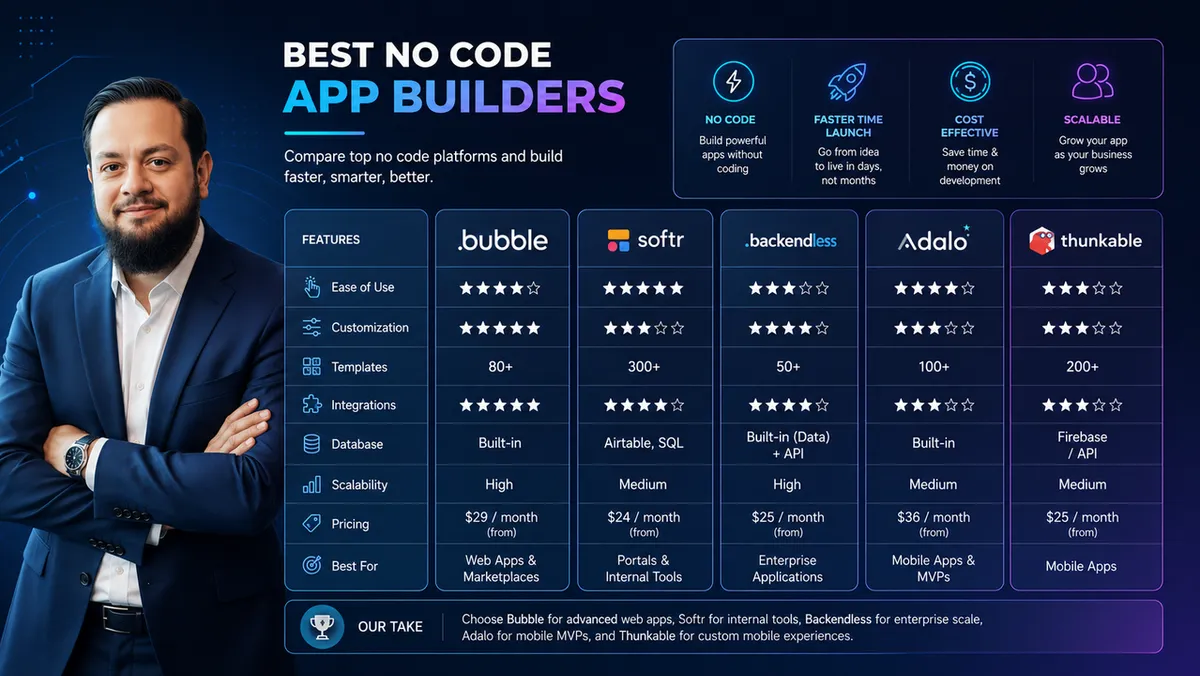
Best No-Code App Builders in 2026 for Startups & Businesses
A few years ago, building a mobile app meant hiring developers, managing technical teams, and spending months waiting for a launch.
That changed fast.
Now founders, freelancers, agencies, and even small business owners are launching apps without writing traditional code.
And honestly?
Some of the fastest-growing MVPs in 2026 are being built with no-code tools.
I’ve personally seen:
- local businesses launch booking apps in weeks
- creators build subscription platforms without developers
- startups validate ideas before hiring engineers
- agencies deliver client dashboards using visual builders
No-code platforms are no longer “toy tools.”
They’ve become serious business infrastructure.
But there’s also a problem:
Most comparison articles about no-code app builders are shallow.
They list random platforms without explaining:
- who they’re actually for
- scalability limitations
- pricing realities
- AI integrations
- long-term flexibility
This guide breaks all of that down properly.
“The smartest founders in 2026 are not asking how to code faster. They’re asking how to validate ideas faster.”
What Are No-Code App Builders?
No-code app builders are platforms that allow users to create applications using:
- visual editors
- drag-and-drop systems
- workflows
- automation tools
instead of traditional programming.
These tools help users build:
- mobile apps
- web apps
- SaaS products
- marketplaces
- AI tools
- internal business systems
without deep coding knowledge.
Some platforms now even use AI to:
- generate interfaces
- automate workflows
- create databases
- build app logic
This dramatically reduces development time.
Why No-Code Tools Are Exploding in 2026
The demand for apps is growing faster than development teams can handle.
Businesses want:
- faster launches
- lower costs
- MVP validation
- automation
- AI integration
Traditional development is still powerful.
But no-code tools now solve many startup problems faster.
Key Benefits of No-Code Development
✅ Faster MVP Launches
Many apps can launch within days or weeks.
Instead of:
- 6-month development cycles
- expensive engineering teams
startups can validate ideas quickly.
✅ Lower Development Costs
Hiring developers is expensive.
No-code tools dramatically reduce startup costs.
Especially for:
- early-stage founders
- small businesses
- freelancers
- agencies
✅ Easier Experimentation
You can test:
- pricing models
- onboarding flows
- app ideas
- automation systems
without rebuilding everything from scratch.
✅ AI Integrations
Modern no-code platforms integrate with:
- AI APIs
- chatbots
- automation workflows
- content generation systems
This changed the game completely.
Best No-Code App Builders in 2026
Not every platform is good for every project.
Choosing the wrong builder creates scaling problems later.
1. FlutterFlow
FlutterFlow exploded in popularity because it combines:
- visual development
- real Flutter code
- scalability
- modern UI systems
It’s one of the strongest no-code tools for startups right now.
Best For
- startup MVPs
- scalable mobile apps
- AI apps
- SaaS dashboards
Why Developers Like It
Unlike many no-code platforms, FlutterFlow can export actual Flutter code.
That means businesses can later:
- scale traditionally
- hire developers
- customize deeply
without rebuilding everything.
Weaknesses
- learning curve is slightly higher
- advanced logic still requires technical understanding
2. Bubble
Bubble became one of the most powerful no-code web app builders available.
Many real startups were built entirely on Bubble.
Best For (Part 2)
- SaaS products
- marketplaces
- dashboards
- workflow automation
Why Bubble Is Powerful
Bubble allows:
- databases
- backend logic
- workflows
- user authentication
without coding.
It’s incredibly flexible.
Weaknesses (Part 2)
- performance can become challenging at scale
- mobile responsiveness sometimes needs extra work
3. Glide
Glide focuses heavily on simplicity.
It’s one of the easiest tools for beginners.
Best For (Part 3)
- internal tools
- business dashboards
- lightweight apps
- admin systems
Why People Love Glide
You can build apps extremely fast.
Especially useful for:
- startups testing operations
- small businesses
- agencies creating client portals
Weaknesses (Part 3)
- less flexible for advanced products
- limited deep customization
4. Adalo
Adalo became popular because it helps users build real mobile apps visually.
Best For (Part 4)
- beginner app founders
- mobile MVPs
- startup experiments
Strengths
- simple UI builder
- mobile-focused workflows
- easy learning curve
Weaknesses (Part 4)
- scaling complex apps can become difficult
5. Thunkable
Thunkable focuses heavily on cross-platform mobile app creation.
Best For (Part 5)
- educational apps
- simple mobile apps
- prototypes
Strengths (Part 2)
- beginner-friendly
- drag-and-drop logic
- quick prototyping
Weaknesses (Part 5)
- less powerful for advanced systems
6. Softr
Softr is becoming increasingly popular for:
- client portals
- internal systems
- SaaS interfaces
Especially when connected with Airtable.
7. Webflow
Webflow is technically more website-focused, but modern startups increasingly use it for:
- SaaS frontends
- landing pages
- startup validation
- AI product websites
Best AI App Development Tools in 2026
AI is changing no-code development rapidly.
OpenAI API Platform
Many no-code apps now integrate AI features like:
- chatbots
- writing tools
- AI automation
- customer support
through AI APIs.
Zapier
Zapier automates workflows between apps.
Useful for:
- CRM automation
- notifications
- AI integrations
- productivity systems
Make
Make allows advanced visual automation workflows.
It’s incredibly powerful for:
- AI systems
- SaaS workflows
- automation pipelines
How to Choose the Right No-Code Platform
This decision matters more than most founders realize.
Choose FlutterFlow If:
You want:
- scalable mobile apps
- premium UI
- future developer flexibility
Choose Bubble If:
You need:
- complex workflows
- backend-heavy systems
- SaaS platforms
Choose Glide If:
You want:
- simplicity
- speed
- lightweight business apps
Choose Adalo If:
You are:
- a beginner founder
- validating an app idea quickly
Real-World Example
A founder wanted to build a marketplace platform.
Initially they planned:
- full custom development
- large engineering team
- six-month timeline
Instead, they validated the idea using Bubble first.
The result:
- faster launch
- lower costs
- early customer feedback
- proof of demand
Only after traction did they move toward custom development.
That’s the smartest way to use no-code.
Not necessarily as the final system.
But as a speed advantage.
Common Mistakes Founders Make
❌ Building Too Much Too Early
Most startups don’t need advanced architecture immediately.
❌ Ignoring Scalability
Some no-code tools become difficult to scale later.
Plan ahead.
❌ Choosing Based on Hype
The “best” platform depends entirely on:
- business goals
- technical needs
- future plans
❌ Poor UX Design
No-code doesn’t automatically create good experiences.
User flow still matters.
No-Code vs Traditional Development
No-code tools are powerful.
But they’re not magic.
Traditional development still wins for:
- massive platforms
- advanced performance
- complex infrastructure
- highly customized systems
The smartest businesses often combine both approaches.
🔗 Learn the Complete Mobile App Development Process
No-code tools work best when combined with strong app strategy.
👉 Read this: https://abuqitmirlabs.tech/blog/mobile-app-development-guide-for-businesses-startups-2026
This guide covers:
- app planning
- UI/UX
- monetization
- AI integration
- development workflows
🔗 Compare Flutter vs React Native Before Building
Some startups eventually transition from no-code to full development.
👉 Read this: https://abuqitmirlabs.tech/blog/flutter-vs-react-native-which-framework-is-better-for-mobile-app-development-2026
Learn:
- framework differences
- scalability
- startup considerations
- development costs
Final Thoughts
The no-code movement is not replacing developers.
It’s changing how businesses validate and launch products.
The biggest advantage isn’t “avoiding code.”
It’s:
- reducing risk
- launching faster
- testing ideas earlier
- learning from real users sooner
That’s why no-code app builders are becoming essential startup tools in 2026.
The founders moving fastest are often the ones simplifying development — not overcomplicating it.
FAQs
1. What is the best no-code app builder in 2026?
FlutterFlow and Bubble are currently among the strongest no-code platforms for scalable apps.
2. Can no-code apps scale?
Yes, but scalability depends on the platform and app complexity.
3. Is no-code better than traditional development?
Not always. No-code is excellent for MVPs and validation, while traditional development works better for advanced systems.
4. Can AI be integrated into no-code apps?
Yes. Most modern no-code platforms support AI APIs and automation workflows.
5. Are no-code platforms good for startups?
Absolutely. They help startups validate ideas quickly with lower costs.
Related Engineering Resources
- For engineering teams deploying production workflows, explore our blueprint on custom AI agent development and enterprise RAG architecture and our AI automation solutions.
- High-converting software pairs engineering rigor with distinctive positioning—explore our strategic brand building and UI/UX design systems and graphics design studio.